Scheduled: Win-back cadence
Repeating win-back without a fourth campaign, one recurring Scheduled campaign, an audience that genuinely moves, and a guard that stops it repeating on the same members
This playbook runs on RFM segments, which come with the Smart Segmentation add-on. If you don't see RFM: tags in your tag picker, the add-on isn't active for your business. Ask your provider to switch it on. Without the add-on, Win-back without RFM wins back lapsed members with a tag instead.
Step 1: Kind Scheduled, name it Win-back cadence.
Step 2: Two tiles:
- Specific time → Frequency Every 30 days (or Every 90 days), At a quiet hour, Start date tomorrow or later.
- To registered members → Specific members → Member attributes:
- Tags contains any of
RFM:atRisk: the segment. - Tags does not contain
Winback_Sent: the re-send guard.
- Tags contains any of
Step 3: Three actions stacked: Send asset (win-back Gift) + Send SMS + Tag member Winback_Sent.
Step 4: Save, set Active.
Then one Rule to clean up: trigger Makes a purchase → action Untag member Winback_Sent.
Works because tags are re-scored; a purchase date range is not. See Gotchas.
A win-back campaign asks the hardest question a loyalty engine gets: "who has stopped coming?" Nothing happens when a member stops visiting, there is no event to react to, so a Rule has nothing to listen for. What you can do instead is wake up on a cadence, look at who currently qualifies, and act on them. That is exactly what a Scheduled campaign is.
Since the August 2026 Scheduled update, one Scheduled campaign gives you all three things a repeating win-back needs:
- Repetition: Every 30 days or Every 90 days, anchored to a start date you pick.
- A real segment: the full Member attributes + Member actions filter, the same one Filter members uses.
- A fresh read each run: the campaign re-reads its audience every time it fires, rather than messaging a list frozen at save time.
There is no separate "win-back" campaign kind, and there does not need to be. Win-back is a recipe on the Scheduled kind, the same way birthday is.
The one thing that makes or breaks it
Point 3 above, the fresh read, is only worth something if the filter itself produces a different answer over time.
- Tags are dynamic. RFM re-scores your members every night and re-applies its tags, and your own tags get added and removed by Rules. A filter on Tags returns a genuinely different set of members each run.
- Purchase date ranges are frozen. Did not made a purchase takes an absolute Start date and End date. Re-reading
01.05 – 30.07on 1 September gives you the same answer it gave on 1 August. The member who lapsed in August is never caught, because they did buy inside the window.
So every recipe on this page is built on a tag. That is not a stylistic preference, it is the difference between a campaign that follows your members and one that re-reads the same frozen list forever.
The three-part win-back picture
Win-back is not one campaign. It is three, at three different distances from the moment a member drifts:
| Distance | What to use | Where |
|---|---|---|
| The moment they slip | A Rule on the Tagged trigger (real-time, fires once per slip) | Win back At Risk |
| They stayed away | A Scheduled campaign on a 30 / 90-day cadence (this page) | Below |
| Long gone | One deliberate annual push to RFM:Lost | Reactivate Lost |
Build the real-time Rule first, it is the highest-return of the three and it catches members earliest. This page is what you add when you also want a periodic sweep for the members the Rule missed, or who slipped while it was paused.
Before you start
3 prerequisites: a dynamic segment, a Gift, and a message template
- A tag that moves on its own. The easy answer is RFM: the nightly re-scoring keeps
RFM:atRiskandRFM:Lostcurrent with no work from you. See Segments. RFM comes with the Smart Segmentation add-on. If it isn't active for your business, you need some other tag that a Rule maintains, a static tag you applied by hand once will not do, because it never changes and the campaign will hit the same people every cycle. Win-back without RFM builds exactly that tag. - The win-back Gift exists under Benefits → Gifts, with a short expiry: a week or two. Urgency lives on the Gift, not on the cadence. See Gifts.
- The message template exists under Comm. Templates. See SMS template.
Walkthrough
Marketing → Smart campaigns → Create campaign.
Step 1: Campaign details
Kind Scheduled. Name it Win-back cadence. Put the cadence and the offer in the description, a recurring campaign's why is not visible anywhere else, and in six months you will want it.
Step 2a: Specific time (the cadence)
Open the Specific time tile.
- Frequency: Every 30 days for an active sweep, Every 90 days for a lighter touch. There is no monthly option; Every 30 days is the nearest and drifts against calendar months, which does not matter here.
- At: a quiet hour.
10:00is a reasonable default, and it is read in your business timezone. - Start date: required on any non-daily frequency, and it must be in the future. Every later run counts forward from this date.
- Has end date: leave it off unless you want the sweep to retire itself. Off means "runs until you pause it".
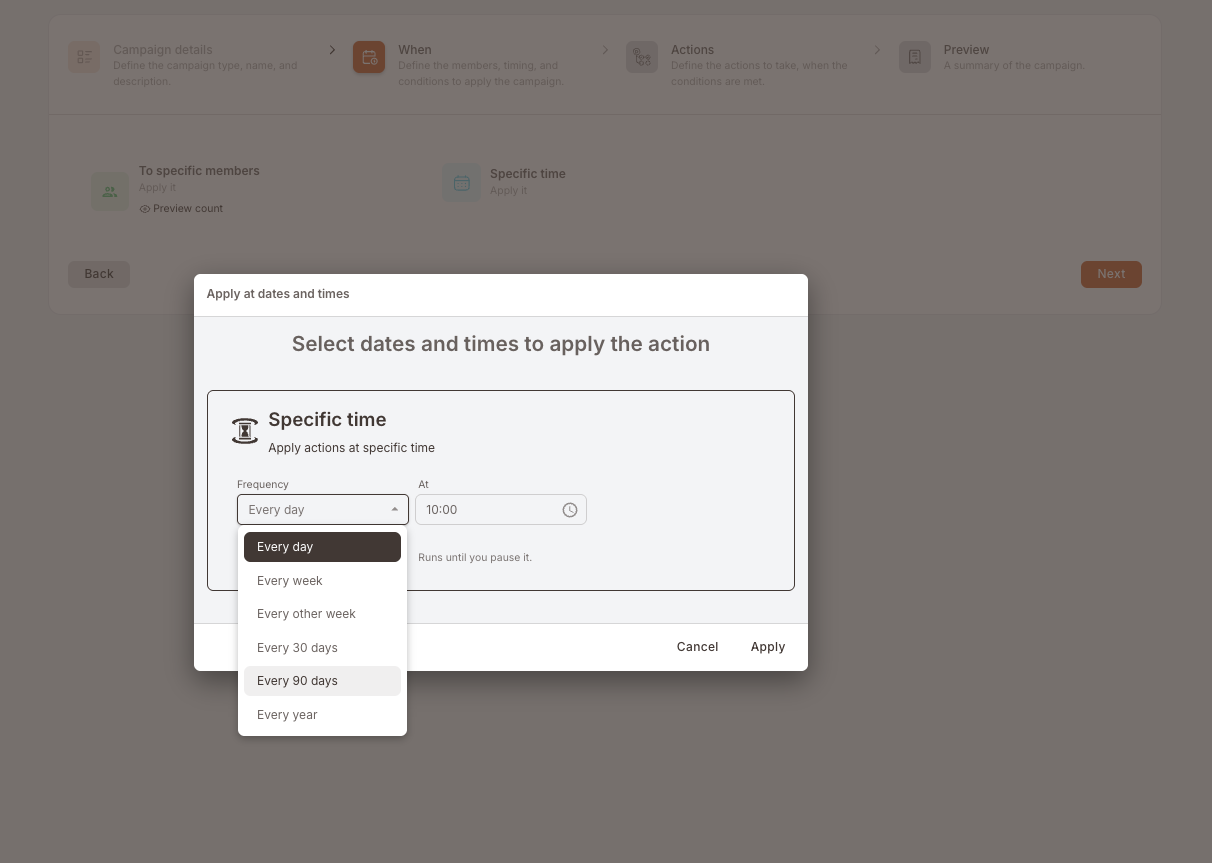
If you switch Has end date on, that date is the last day the campaign may repeat: not the day your promotion expires. Set it before the next occurrence and the campaign quietly stops with no error. Full explanation on the Scheduled overview.
Step 2b: Apply to members (the audience)
Open the To registered members tile, choose Specific members, and build two Member attributes rows. Both must match.
Row 1: the segment.
Tags → contains any of → RFM:atRisk.
This is the row that moves. Every night RFM re-scores, and every run this filter returns whoever is At Risk at that moment.
Row 2: the re-send guard.
Tags → does not contain → Winback_Sent.
Without this row, a member who stays At Risk gets the same gift every 30 days forever. Step 3 applies this tag as one of its actions, so a member drops out of the audience on the run immediately after they are gifted. The cleanup Rule below takes it off again when they come back.
No join-date row. RFM keeps a recent joiner in New until they have been a member long enough to score, so someone who registered last week cannot be At Risk. Do not add a Joined date row as an extra guard: it takes a fixed date, so on a repeating campaign it never moves, and after a few runs it quietly shuts out everyone who joined after that date.
Click Preview count before you leave the tile. If the number is implausibly large, the guard row is missing or inverted.
Step 3: Actions
Three actions, stacked, all on No delay:
- Send asset → your win-back Gift, Quantity 1.
- Send SMS (or Send email) → your win-back template. Watch the Charged messages counter, dynamic fields expand at send time.
- Tag member →
Winback_Sent.
Action 3 is what makes row 2 of the audience work. Leave it out and the campaign repeats on the same members indefinitely.
Step 4: Preview
Confirm the cadence line reads what you expect, for example Every 30 days · 10:00 · Start date: 01.09.2026 · Runs until you pause it: the audience shows both rows, and Actions shows three. Save, then set the campaign Active from the list. A Scheduled campaign left in Draft does not fire.
The cleanup Rule (required)
The Scheduled campaign only tags. Something has to untag, or a member who comes back stays permanently ineligible for a future win-back.
Build one Rule:
- Trigger: Makes a purchase.
- Audience: Specific members → Tags contains any of
Winback_Sent. - Action: Untag member →
Winback_Sent.
Now the loop closes: gifted members are excluded, a purchase clears the flag, and if they drift again months later they are eligible again.
Measure it the right way
Judge it by segment movement, not by opens
The question is not how many people opened the SMS, it is how many moved back. Two to four weeks after a run, check how many of the members it touched are now tagged RFM:Loyal or RFM:Champions instead of RFM:atRisk. That movement is the metric.
Note the honest limitation: the platform does not yet stamp issued Gifts with the campaign that issued them, so "how much revenue did this campaign bring back" cannot be answered exactly today. Segment movement and Gift redemption counts are the closest available read.
Variations
3 tweaks: a Lost cadence, a two-rung ladder, and the date-window route
A slower cadence for Lost. Same shape, RFM:Lost instead of RFM:atRisk, Every 90 days or Every year. What that segment should be sent, and why it earns one deliberate touch rather than a drip, is Reactivate Lost's subject. Read it before you build this one.
A two-rung ladder. Run both: one Every 30 days on RFM:atRisk with a modest offer, one Every 90 days on RFM:Lost with a strong one. Because RFM moves members between the two segments on its own, a member climbs the ladder without you maintaining anything. Add Tags does not contain RFM:Lost to the At Risk campaign if you want to be certain nobody is in both on the same day.
Fixed-window buckets, and what they cost. If you need literal "no purchase in the last 1 / 2 / 3 / 6 months" buckets rather than RFM's venue-tuned segments, you can build them with Member actions → Did not made a purchase between two dates. But the dates are absolute, so this cannot be left to repeat: put it on a Future Campaign and re-run it each cycle with a fresh date range. Keep the re-send guard, and add a Joined date row set to the start of the window so members who registered during it are left out; refresh that date along with the window. Do not put a fixed window on a recurring Scheduled campaign, see the first gotcha below for what happens.
Gotchas
4 things that commonly trip people up
- A frozen date range on a recurring campaign is the classic trap. Did not made a purchase takes absolute dates, so a recurring campaign carrying one re-reads the same window forever. Two things go wrong at once, and the second is worse than the first: the members who lapsed since the window are never caught, because they did buy inside it, and every member who has registered since the window matches it trivially, having made no purchase during a period when they were not yet a member. So the audience misses the people you want and quietly fills up with new joiners. Filter on a tag, or run it as a Future Campaign and refresh the dates by hand.
- No tag action, no guard. Row 2 of the audience only works if step 3 actually applies
Winback_Sent. It is easy to build the audience, admire the Preview count, and forget the third action. - No cleanup Rule, no second chance. Without the untag Rule,
Winback_Sentis permanent and the member can never be won back again. - Paused runs are lost. A scheduled run that would have fired during a pause does not catch up when you resume, the members who qualified that day are simply skipped until the next occurrence. Also worth knowing: the campaign runs at most once per calendar day, so nudging the schedule forward to re-test it a second time on the same day does nothing.